Adding New Measurements
If required, you can add new measurements to the table of any object from which you imported scalar data.
How to Add a New Measurement
-
Select the required table in the Tables tree menu.
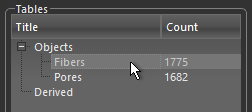
Note Refer to the topic Importing Scalar Data for information about importing scalar data.
-
Click the New Measurement
 button.
The Compute Measurements dialog appears.
-
Choose the required measurement(s) in the dialog.
Note Refer to the topics Computing Measurements for Multi-ROIs, Computing Measurements for Meshes, Computing Measurements for Graphs, and Computing Measurements for Vector Fields for information about computing measurements for multi-ROIs, meshes, graphs, and vector fields.
